

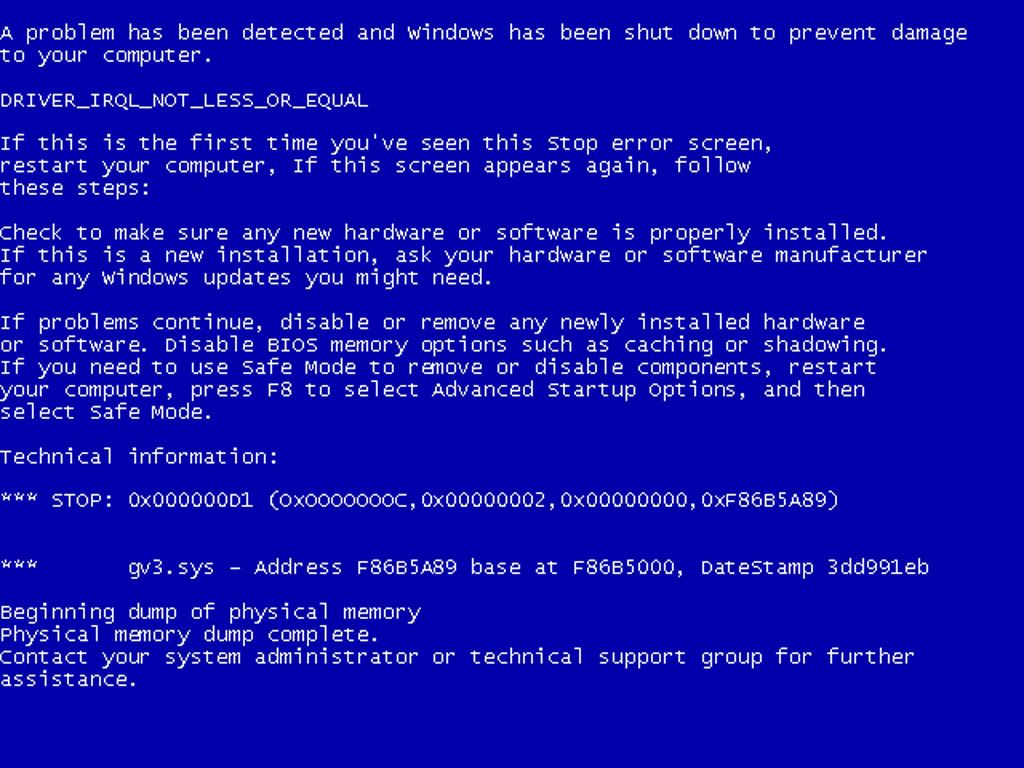
.jpg) Blue Screen of Death!! Appearance blue layer that displays an error message that appears in the Windows system damage that can not recover. The emergence of BSOD or bluescreen of Death caused by a variety of problems both from the system and the hardware. The emergence of BSOD can actually help us to know where the damage that causes the computer we become confused. But for ordinary users, the emergence of BSOD can be pretty scary, because exactly the messages on the BSOD can be confusing ordinary user, and frankly, just a lot of messages on the BSOD that seemed "disconnected" in explaining the location of the problem sector.
Blue Screen of Death!! Appearance blue layer that displays an error message that appears in the Windows system damage that can not recover. The emergence of BSOD or bluescreen of Death caused by a variety of problems both from the system and the hardware. The emergence of BSOD can actually help us to know where the damage that causes the computer we become confused. But for ordinary users, the emergence of BSOD can be pretty scary, because exactly the messages on the BSOD can be confusing ordinary user, and frankly, just a lot of messages on the BSOD that seemed "disconnected" in explaining the location of the problem sector.
BSOD parts are categorized as follows:
• Hexadecimal codes: The writing crash codes.
• Memory Dump Message: Indicates that the process was taking place in memory is copied into a file on disk for debugging purposes. This debugging file usually required the technicians to analyze and correct errors.
• IRQL_NOT_LESS_OR_EQUAL (0X0000000A): This is the mastermind of pure BSOD culprit. Because generally the BSOD, this message most often appears. This error message is generally caused by a mismatch because they have the drivers installed on your computer.
List of Causes:
1. Problem drivers clashed or unsuitable
2. Problems Video Card, this includes the video card overclock you exceed the limit or just changed your video card and drivers do not uninstall the old video card from a different chipset.
3. Audio Cards problems, including configuration errors or bugs in the sound card drivers.
Understanding the bluescreen of Death Windows XP-1
• NTFS_FILE_SYSTEM or FAT_FILE_SYSTEM (0X00000024) or (0X00000023): The damage in the partition or filesystem but not on the hard drive. We can check by examining the SATA or PATA cable or can check the partition with chkdsk tool.
• UNEXPECTED_KERNEL_MODE_TRAP (0X0000007F); When you get a message like this, can be caused by:
1. Hardware Overclock excessive
2. Overheated computer component
3. BIOS corrupt
4. Memory and CPU is disabled
• DATA_BUS_ERROR: This message is caused because of the possibility that memory or the memory slot on the motherboard is damaged.
• PAGE_FAULT_IN_NONPAGED_AREA: Caused due to damage to hardware, including main memory, video card memory, or memory in the processor (L2 cache).
• INACCESSIBLE_BOOT_DEVICE: Caused due to an error in the configuration jumpers in the wrong disk, boot sector viruses, the IDE controller driver is wrong, or the chipset driver error.
• VIDEO_DRIVER_INIT_FAILURE: An error occurred on the installation of video card drivers are not perfect restart during installation or can also occur because of errors in the driver installation.
• BAD_POOL_CALLER: This error can occur because of errors or incompatible drivers. Often occurs during the installation of XP from an upgrade, or not from the new installation.
• PEN_LIST_CORRUPT: This message is caused because of the damage RAM
• MACHINE_CHECK_EXCEPTION: Caused by a defective CPU, or that the overclock aggressively, and power supply shortages or damaged power ..
Thank you. If there are shortcomings or mistakes, please comment.
skip to main |
skip to sidebar
![]()


|
|


Comments
|
|

0 comments:
Post a Comment